
Download the latest official JoiPlay APK Patreon Build for Android with updated plugins. Emulator for playing PC indie games without porting.
APP Info
| Name | JoiPlay |
| Publisher | JoiPlay |
| Genre | Emulator |
| Size | 26 MB |
| Version | 1.21.000 |
| Operating System | Android 6 and up |
| MOD Info | Patreon Version |
 (rate it)
 Loading...
Related Game: GameHub

JoiPlay Emulator Overview
Mobile gaming has become more powerful than ever, but many excellent PC indie games are still unavailable on Android. JoiPlay APK solves this problem by allowing users to run compatible PC game projects directly on their Android devices. Instead of waiting for an official mobile release, you can launch supported games using a modular emulator system designed for several popular game engines.
Whether you enjoy visual novels, role-playing games, or browser-based adventures, JoiPlay offers an easy way to keep your favorite indie titles in your pocket.
Why JoiPlay Stands Out
Unlike traditional Android emulators that simulate an entire operating system, JoiPlay focuses on interpreting compatible game projects created with specific development engines. This approach allows many indie games to run on Android without requiring developers to create separate mobile versions.
The application uses plugins to extend compatibility, making it flexible and easy to update as support for additional engines improves.
Wide Range of Engine Support
One of JoiPlay’s biggest advantages is the number of game engines it supports. This allows players to enjoy thousands of community-created and commercial indie games.
Supported engines include:
- Ren’Py
- RPG Maker XP
- RPG Maker VX
- RPG Maker VX Ace
- RPG Maker MV
- RPG Maker MZ
- TyranoBuilder
- Construct 2
- Construct 3
- Godot (GDScript)
- Adobe Flash
- HTML5 Games
Thanks to this broad compatibility, users can play everything from story-driven visual novels to classic RPG adventures and browser-based games.
Features You’ll Appreciate
JoiPlay includes several useful features designed to improve the mobile gaming experience.
- Play compatible PC indie games on Android.
- Modular plugin system for different engines.
- Supports both visual novels and RPGs.
- Built-in game library for quick access.
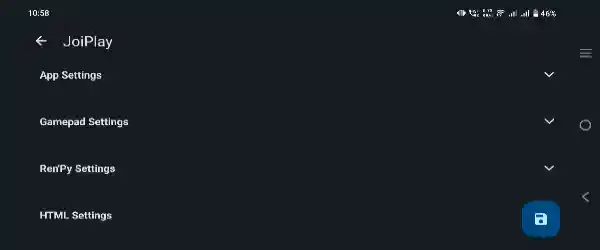
- Customizable virtual gamepad controls.
- Individual settings for each game.
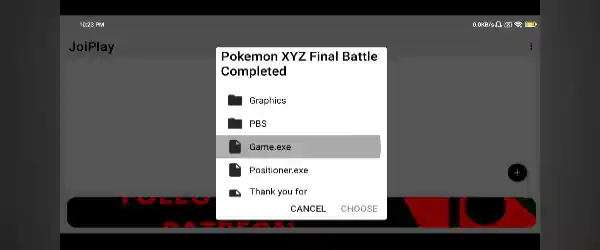
- Supports Game.exe and HTML5 game files.
- Clean and lightweight interface.
- No native Android port required for supported titles.
- Regular plugin updates improve compatibility.
Simple Setup Process
Getting started with JoiPlay doesn’t require advanced technical knowledge.
- First, install the JoiPlay APK along with the plugin needed for your game’s engine.
- Next, copy your game folder from your computer or download it directly to your Android device from an official source.
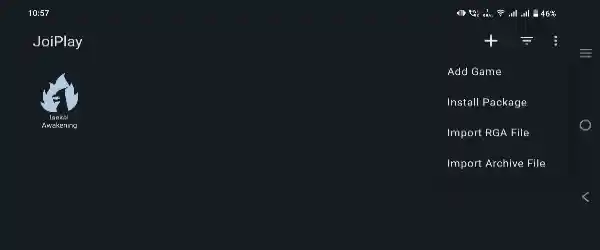
- Launch JoiPlay, tap the Add Game button, and browse to the game’s executable file, such as Game.exe or index.html.
- Once the game has been added, configure your preferred control layout and launch the game.
Designed for Multiple Game Genres
JoiPlay is suitable for many different types of indie games.
- Visual novel fans can enjoy branching stories, animated scenes, save systems, and rollback features commonly found in Ren’Py projects.
- RPG enthusiasts can experience games developed with various RPG Maker versions, including both classic and modern releases.
- Browser-based games created using HTML5 or Construct can also be launched, giving users access to an even larger collection of indie content.
Flexible Plugin System
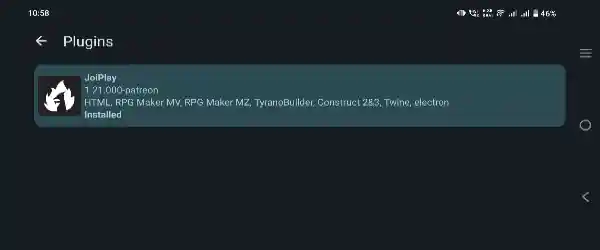
Instead of including every engine inside one application, JoiPlay uses a modular plugin system. This design keeps the core application lightweight while allowing users to install only the plugins they actually need.
When support improves for a particular engine, updating its plugin is usually enough to gain new compatibility without reinstalling the entire application.
This modular approach also makes maintenance much easier for users.
Better Mobile Controls
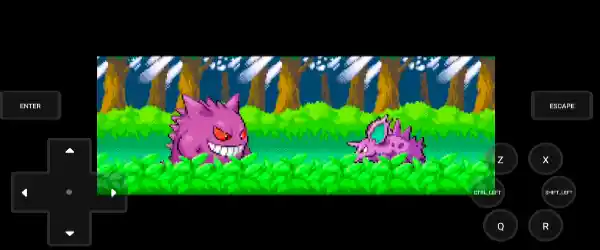
Many PC games are designed for keyboards and mice, but JoiPlay includes customizable touchscreen controls that make gameplay more comfortable on Android devices.
Players can adjust button placement, virtual gamepad layouts, and other settings according to personal preference. Individual game profiles also allow different configurations for different titles.
Who Should Use JoiPlay?
JoiPlay is an excellent choice for players who enjoy indie games but prefer gaming on mobile devices.
It’s especially useful for:
- Visual novel readers
- RPG Maker fans
- Indie game collectors
- Android gamers
- Users who want portable access to PC game projects
- Players looking for an emulator focused on supported indie engines
Final Thoughts
JoiPlay APK has become one of the most popular Android solutions for running compatible PC indie games. With support for Ren’Py, RPG Maker, TyranoBuilder, Construct, Godot, Adobe Flash, and HTML5 projects, it offers impressive flexibility for players who want more than standard mobile games.
Its modular plugin system, customizable controls, simple game management, and broad engine compatibility make it a practical option for enjoying indie titles without native Android ports. If you want to experience your favorite PC visual novels, RPGs, or browser-based games on Android, JoiPlay provides a reliable and convenient way to do it.